
Duplicate RC Download Online – Apply for a Duplicate Registration Certificate (RC)
Duplicate RC Download – Quick Guide
Lost your vehicle Registration Certificate (RC)? Don’t worry. Vehicle owners in India can apply for a Duplicate RC online through the Parivahan portal and access digital vehicle documents through DigiLocker and mParivahan after approval.
Duplicate RC Status Checker
Check your Duplicate RC application status and continue to the official government portal for verification.
Redirecting to Official Government Portal…
Disclaimer: This tool does not directly access government databases. Users are redirected to the official Parivahan portal for application verification and status checks.
A Duplicate Registration Certificate is a legally valid replacement for the original RC and can be issued if the original RC is lost, stolen, damaged, destroyed, or becomes unreadable.
What is a Duplicate RC?
A Duplicate Registration Certificate (RC) is an officially issued replacement copy of the original vehicle registration certificate. It contains the same registration details and remains legally valid for vehicle ownership verification, insurance purposes, vehicle transfer, and road compliance requirements.
Read Also: Driving Licence Status Check Online
How to Apply for Duplicate RC?
- Visit the Parivahan Vehicle Services Portal.
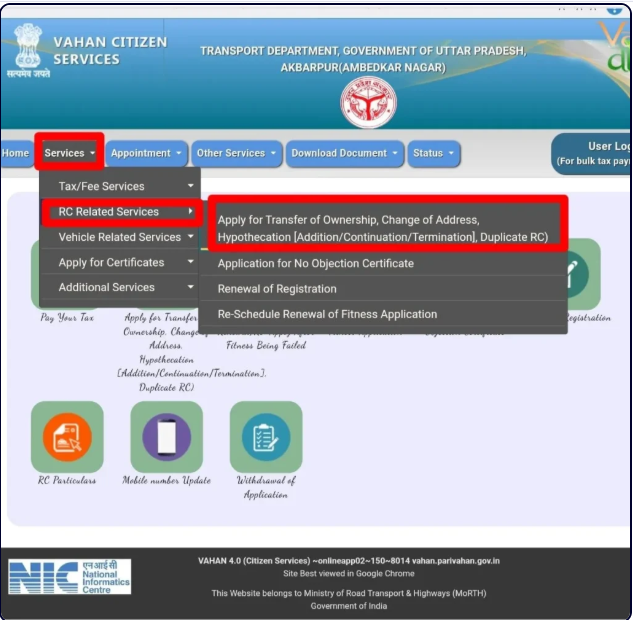
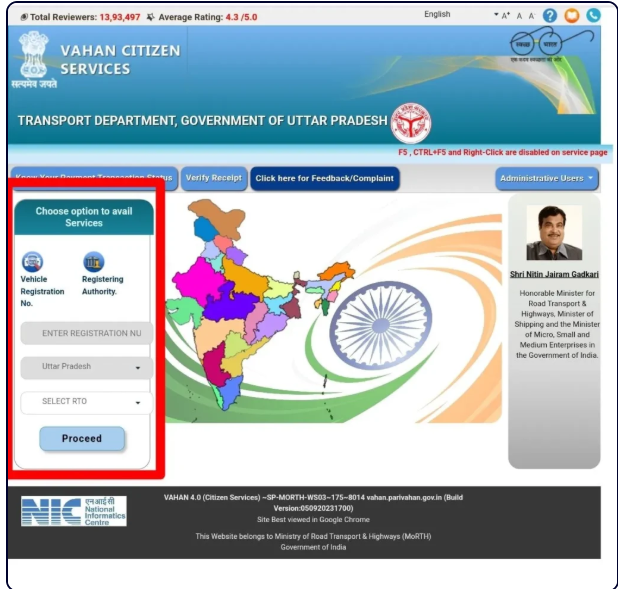
- Select your state and RTO.
- Enter your vehicle registration number.
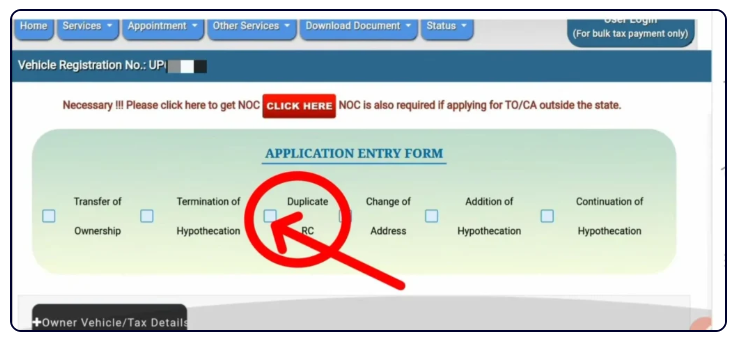
- Choose Duplicate RC service.
- Upload required documents.
- Pay the applicable fee.
- Submit the application.
- Track application status online.
Can I Download Duplicate RC Online?
Yes. After approval, vehicle owners can access their digital Registration Certificate through DigiLocker or the mParivahan application. Physical smart card delivery may also be available depending on state transport authority rules.
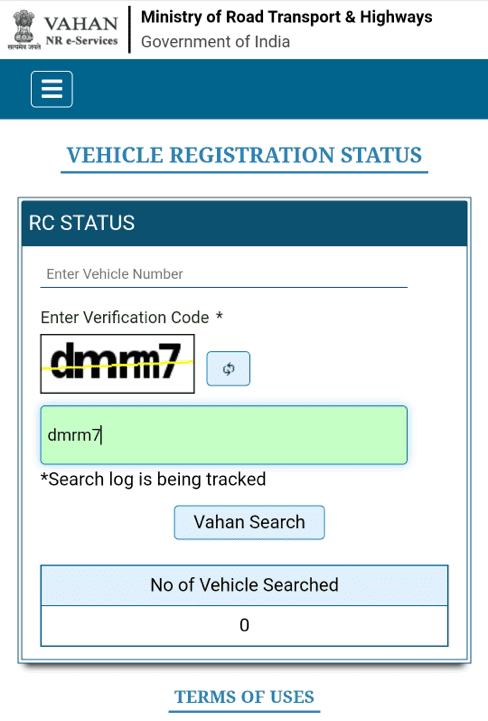
What is a Registration Certificate (RC)?
A Registration Certificate (RC) is one of the most important documents associated with a vehicle in India. It serves as official proof that a vehicle has been registered with the appropriate Regional Transport Office (RTO) under the Motor Vehicles Act.
Read Also: Driving Licence Download Online
✔ Vehicle Registration Number
✔ Owner Name
✔ Chassis Number
✔ Engine Number
✔ Vehicle Class
✔ Fuel Type
✔ Registration Date
✔ Registration Authority
✔ Vehicle Manufacturer Details
✔ Insurance Information (where applicable)
Without a valid RC, vehicle ownership verification can become difficult and many vehicle-related services may not be processed.
When Do You Need a Duplicate RC?
Vehicle owners generally apply for a Duplicate Registration Certificate in the following situations:
Lost Registration Certificate
If the original RC has been misplaced or cannot be found, applying for a duplicate copy becomes necessary.
Stolen RC
If your RC has been stolen, it is recommended to file a police complaint and obtain an FIR before applying for a duplicate certificate.
Damaged or Torn RC
Physical RC books and documents may become damaged over time. If important information is no longer readable, a replacement should be requested.
Destroyed Due to Fire or Water Damage
Documents affected by accidents, floods, fire incidents, or severe damage may require replacement.
Unreadable Smart Card RC
If the smart card becomes damaged or its information can no longer be verified, a duplicate RC can be requested.
Correction and Re-Issue Situations
In certain situations, vehicle owners may be instructed by transport authorities to apply for RC re-issuance when document verification issues arise.
Documents Required for Duplicate RC Download and Application
Before starting the application process, keep the following documents ready.
Read Also: Vehicle Owner Details – Check Vehicle Information Online 2026
Required Document Checklist
Document Purpose
Form 26 Application for Duplicate RC
FIR Copy (if lost/stolen) Proof of loss or theft
Identity Proof Owner verification
Address Proof Address verification
Vehicle Insurance Certificate Vehicle compliance verification
PUC Certificate Pollution compliance
Road Tax Receipt Tax verification
Chassis Number Imprint Vehicle verification
Passport Size Photograph Applicant identification
PAN Card/Form 60 Tax compliance
NOC (if required) Special registration cases
Accepted Identity Proofs
• Aadhaar Card
• PAN Card
• Passport
• Voter ID
• Driving Licence
Accepted Address Proofs
• Aadhaar Card
• Utility Bill
• Passport
• Bank Statement
• Government-issued Address Proof
Important Note:
Document requirements may vary slightly depending on the state transport authority and vehicle category. Always verify current requirements through the concerned RTO before submitting the application.
Duplicate RC Fees in India
Duplicate RC charges depend on vehicle category and registration type.
Indicative Duplicate RC Fee Structure
Vehicle Category Approximate Fee
Motorcycle / Two-Wheeler ₹150
Light Motor Vehicle (LMV) ₹300
Medium Goods Vehicle ₹500
Heavy Goods Vehicle ₹750
Imported Motorcycle ₹2,500
Imported Motor Vehicle ₹2,500
Heavy Passenger Vehicle ₹2,500
Additional Charges May Include:
• Smart Card Fee
• Service Charges
• Postal Charges
• State-Specific Processing Fees
• Late Application Penalties (where applicable)
Before making payment, always verify the latest fee structure on the official Parivahan portal because charges may be revised by transport authorities.
Why Applying Quickly is Important
Many vehicle owners delay the duplicate RC process after losing their registration certificate. However, postponing the application can create unnecessary complications.
A missing RC may affect:
• Vehicle Transfer Process
• Insurance Claims
• Loan Closure Procedures
• Ownership Verification
• Vehicle Sale Transactions
• Traffic Verification Requests
Applying early helps avoid administrative delays and ensures your vehicle records remain complete and accessible whenever required.
How to Apply for Duplicate RC Online Through Parivahan
The Ministry of Road Transport and Highways (MoRTH) provides an online facility for vehicle owners to apply for a Duplicate Registration Certificate through the Parivahan Vehicle Services Portal. This process helps reduce paperwork and allows applicants to track their application online.
Follow the steps below:
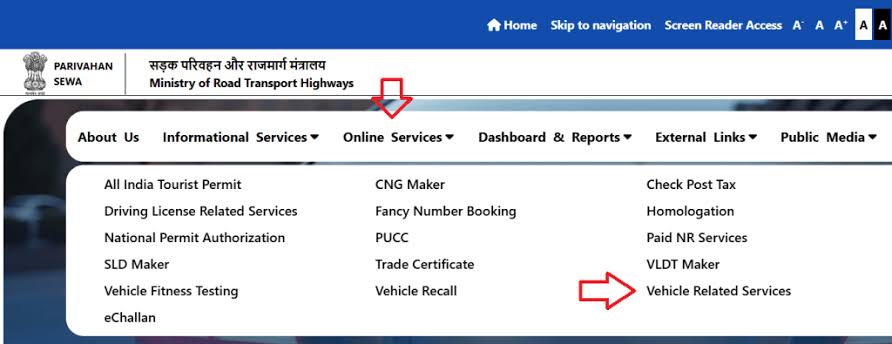
Step 1: Visit the Official Parivahan Portal
Open the official Parivahan Vehicle Related Services portal.
Step 2: Select Your State
Choose the state where your vehicle is registered.
The system will redirect you to the state transport services dashboard.
Step 3: Enter Vehicle Registration Number
Enter your vehicle registration number and continue.
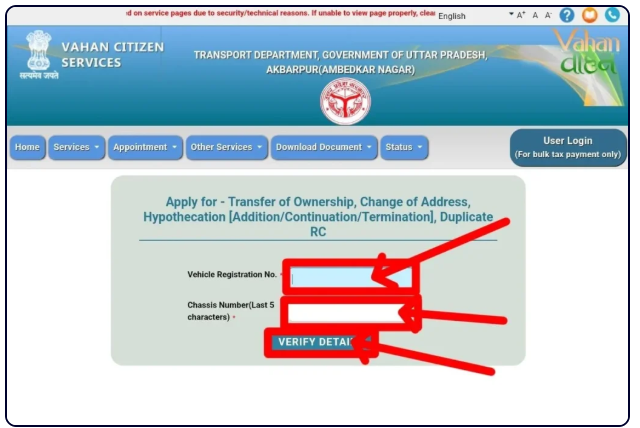
The portal will retrieve basic vehicle details.
Step 4: Verify Vehicle Information
Provide the required chassis number and verify vehicle information.
Step 5: Choose Duplicate RC Service
From the available RC-related services, select:
Duplicate Registration Certificate (Duplicate RC)
Step 6: Verify Mobile Number
An OTP may be sent to the registered mobile number linked with vehicle records.
Enter the OTP to continue.
Step 7: Upload Required Documents
Upload all required documents including:
• Form 26
• FIR (if applicable)
• Insurance Certificate
• Address Proof
• Identity Proof
• PUC Certificate
• Other state-specific documents
Step 8: Pay Application Fee
Pay the required fee using:
• UPI
• Debit Card
• Credit Card
• Net Banking
Step 9: Submit Application
Review all information carefully and submit the application.
An application number will be generated.
Save this number for future tracking.
Step 10: Track Application Status
Use the application reference number to monitor processing progress online.
Duplicate RC Offline Process Through RTO
Although online services are available in most states, some situations may still require a visit to the Regional Transport Office (RTO).
Offline Application Process
- Visit the concerned RTO.
- Obtain Form 26.
- Submit required documents.
- Provide FIR copy (if RC is lost or stolen).
- Pay the prescribed fee.
- Complete vehicle verification if requested.
- Collect acknowledgement receipt.
- Wait for approval and issuance.
Some RTOs may also schedule document verification before processing the duplicate RC application.
How to Check Duplicate RC Application Status
After submitting your application, you can track the status online without visiting the RTO.
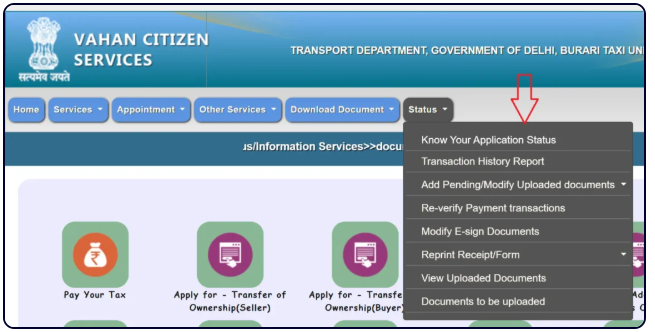
Steps to Check Duplicate RC Status
- Visit the official Parivahan Portal.
- Open Vehicle Related Services.
- Select your state.
- Click on Status.
- Choose Know Your Application Status.
- Enter:
• Application Number
• Registration Number (if required)
• Captcha Code
- Click Submit.
Your application status will be displayed on the screen.
Possible Application Status Messages
Status Meaning
Application Submitted – Application received successfully.
Under Process – Verification is in progress.
Pending Verification – Documents require verification.
Approved – Application approved.
RC Printed – Duplicate RC has been printed.
Dispatched – RC has been sent for delivery.
Rejected – Application requires correction or resubmission.
How Long Does It Take to Get a Duplicate RC?
Processing time varies by state, vehicle category, and RTO workload.
Typical Processing Timeline
Application Review: 2–7 Days
Document Verification: 3–10 Days
RC Approval: 5–15 Days
RC Printing & Dispatch: 3–10 Days
Expected Total Time: 7–30 Days
In some states, processing may be faster through digital verification systems.
Can You Download Duplicate RC Online?
Many vehicle owners search for "Duplicate RC Download" because they want immediate access to their registration certificate after approval.
The good news is that digital vehicle documents are now accepted across India through government-approved platforms.
After approval, you may access your RC digitally through:
• DigiLocker
• mParivahan
• State Transport Systems (where available)
Digital RC documents are considered legally valid under applicable government notifications.
Duplicate RC Download Through DigiLocker
DigiLocker is an official digital document platform supported by the Government of India.
Once your RC is approved and available in government databases, it can usually be fetched through DigiLocker.
Steps to Access RC in DigiLocker
- Log in to DigiLocker.
- Open Issued Documents.
- Select Ministry of Road Transport and Highways (MoRTH).
- Choose Registration Certificate (RC).
- Enter required vehicle details.
- Retrieve the digital RC.
- Save the document for future use.
✔ Official Government Platform
✔ Digital Verification
✔ Easy Access
✔ Cloud Storage
✔ Accepted During Vehicle Checks
Duplicate RC Download Through mParivahan
mParivahan is another government-supported platform designed specifically for vehicle and driving licence services.
Vehicle owners can access their virtual RC through the application.
Steps to Access RC Using mParivahan
- Install the mParivahan App.
- Sign in using your mobile number.
- Open RC Services.
- Add Vehicle Details.
- Fetch RC Information.
- View Virtual RC.
- Save for future reference.
Benefits of mParivahan RC
✔ Legally Accepted
✔ Mobile Access
✔ Real-Time Vehicle Information
✔ Quick Verification
✔ Easy Sharing
Common Duplicate RC Problems and Solutions
Application Not Found
Possible Causes
• Incorrect application number
• Wrong registration number
• Processing delay
Solution
Verify entered details and try again after 24–48 hours.
OTP Not Received
Possible Causes
• Mobile number mismatch
• Network issue
• Outdated vehicle records
Solution
Contact the concerned RTO to update registered contact information.
Document Rejection
Possible Causes
• Blurry uploads
• Missing documents
• Incorrect file formats
Solution
Upload clear and valid copies of required documents.
Application Pending for Long Time
Possible Causes
• RTO backlog
• Verification delay
• Additional review
Solution
Contact the concerned RTO or use the Parivahan grievance system.
Digital RC Not Available
Possible Causes
• Records not synchronized
• Recently approved application
Solution
Wait for database synchronization and try again after a few days.
State-Wise Duplicate RC Services
Duplicate RC services are available across most Indian states through integrated transport systems.
Popular State Searches
Duplicate RC Download Delhi
Duplicate RC Download Maharashtra
Duplicate RC Download Karnataka
Duplicate RC Download Telangana
Duplicate RC Download Gujarat
Duplicate RC Download Uttar Pradesh
Duplicate RC Download Rajasthan
Duplicate RC Download Punjab
Duplicate RC Download Haryana
Duplicate RC Download Tamil Nadu
Duplicate RC Download Kerala
Duplicate RC Download West Bengal
While the overall process remains similar nationwide, specific document requirements, fee structures, and processing timelines may vary slightly depending on the state transport authority.
Is a Duplicate RC Legally Valid?
Yes. A Duplicate Registration Certificate issued through the authorized transport authority is legally valid and carries the same legal standing as the original RC.
Once approved and issued by the concerned Regional Transport Office (RTO), the duplicate RC can be used for:
✔ Vehicle Ownership Verification
✔ Insurance Claims
✔ Vehicle Transfer
✔ Loan Closure
✔ Traffic Verification
✔ Roadside Inspections
✔ Vehicle Sale Transactions
✔ Registration Record Verification
Whether you receive a physical smart card or access your RC digitally through DigiLocker or mParivahan, the document remains legally recognized when issued through official government systems.
Important Rules Related to Duplicate RC
Before applying, vehicle owners should understand a few important regulations.
Rule 1: Report Lost or Stolen RC Immediately
If the original RC has been lost or stolen, filing an FIR helps establish proof of loss and prevents misuse.
Rule 2: Vehicle Records Must Match
Details such as:
• Registration Number
• Chassis Number
• Engine Number
• Owner Information
must match official records.
Rule 3: Outstanding Issues May Delay Approval
Applications may be delayed if:
• Road tax is pending
• Insurance has expired
• Vehicle records contain discrepancies
Rule 4: Commercial Vehicles May Require Additional Verification
Commercial vehicles often undergo stricter document verification before duplicate RC approval.
Duplicate RC for Vehicles Under Loan
Many vehicle owners wonder whether they can apply for a duplicate RC if the vehicle is financed through a bank or financial institution.
The answer is yes.
However, additional verification may be required if hypothecation remains active on the vehicle record.
In some cases, transport authorities may request:
• NOC from lender
• Loan information
• Updated ownership records
Vehicle owners should check requirements with their financing institution before applying.
Duplicate RC for Commercial Vehicles
Commercial vehicle owners can also apply for duplicate RCs.
Additional documents may sometimes be required:
• Valid Permit
• Fitness Certificate
• Tax Clearance
• Challan Clearance
Requirements vary by vehicle category and state regulations.
What If Your Duplicate RC Application Is Rejected?
Applications are occasionally rejected due to document or verification issues.
Common Reasons for Rejection
• Incorrect vehicle information
• Incomplete documents
• Invalid identity proof
• Missing FIR
• Chassis number mismatch
• Insurance issues
• Ownership verification failure
How to Resolve Rejection
- Review rejection reason.
- Correct identified issues.
- Upload revised documents.
- Reapply if required.
- Contact the concerned RTO for clarification.
Most issues can be resolved without major difficulty once the required corrections are made.
Duplicate RC Fraud Prevention Tips
Vehicle documents are valuable and can be misused if handled carelessly.
Follow these safety practices:
✔ Store RC copies securely.
✔ Keep digital backups.
✔ Report lost RCs immediately.
✔ Avoid sharing vehicle documents unnecessarily.
✔ Verify all vehicle transactions.
✔ Use only official government portals.
✔ Never pay unofficial agents without verification.
✔ Keep insurance and registration information updated.
Maintaining secure records helps reduce the risk of fraud and identity misuse.
Conclusion
Losing a Registration Certificate can create unnecessary complications, but obtaining a Duplicate RC is now easier than ever through online vehicle services. Whether your RC has been lost, stolen, damaged, or become unreadable, you can apply online, track application status, and access digital vehicle documents through government-approved platforms.
By keeping your vehicle records updated and using official services such as Parivahan, DigiLocker, and mParivahan, you can ensure uninterrupted access to important registration information whenever needed.
Ready to Apply?
Start your Duplicate RC application through the official vehicle services portal and keep your vehicle documentation complete, secure, and legally compliant.
FAQ'S
What is a Duplicate RC?
A Duplicate RC is a replacement copy of the original Registration Certificate issued when the original document is lost, stolen, damaged, or destroyed.
Can I apply for a duplicate RC online?
Yes. Most states provide online application facilities through the Parivahan Vehicle Services portal.
Which form is required for duplicate RC?
Form 26 is commonly required when applying for a duplicate Registration Certificate.
Can I download duplicate RC immediately?
Digital access may become available after approval and synchronization with government systems.
What documents are required?
Identity proof, address proof, insurance certificate, Form 26, FIR (if applicable), PUC certificate, and supporting documents.
What is the duplicate RC fee?
Fees vary by vehicle category and state transport authority.
Can I use DigiLocker instead of a physical RC?
Yes, where legally accepted and issued through official government records.
What happens if my RC is stolen?
File an FIR and begin the duplicate RC application process as soon as possible.